
M&K FIT
How to enter a booking on Tourplan
Insert a booking
Open Fastbook and click on Insert to create a new booking:

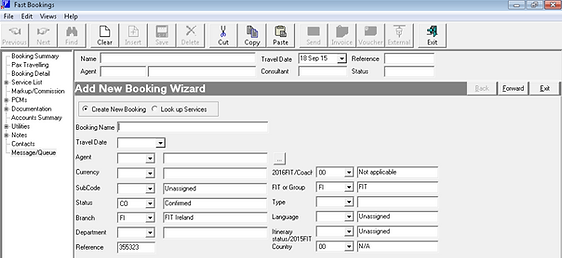
Insert all the information as per below:
-
Booking Name (Please note that this will appear on the Welcome letter and the confirmation of services)
-
Travel Date – First day of the Journey
-
Agent (KEN010 – Kensington, AUD308 – Audley, ALL352 – Winspire or other)
-
Status: don’t change the code if the booking is confirmed. Change it to PR if it’s a quote (to be changed to PC if the quote is then confirmed)
-
Branch : FI for booking in General (including Private bookings) – SM for Abbey Staff booking or Staff weekends
-
Department: NA for North America (for the vast majority of bookings).
-
Type: OA for FIT a la Carte
-
Language: EN for English
-
Country : Specify the Nationality
Click on Forward after and insert the Room and Pax configuration. Please note that pax names will appear on the Welcome letter so please insert as many names as you can.
Click insert room – the room name is the surname of the first guest. It will default to a DBL room, remember to check if you require a Twin, Triple or Single room.
Then click on Add to insert the client’s names.

Click on Save when you finish.
The Booking Details page will appear:

-
Add the Agent Reference or in case of private bookings add the name of the person who requested the booking. This will appear on your proposal. For Audley bookings, this is where you enter the Audley reference.
-
Add the Email address and the name of the Agent in the Contact (depends on the market, not all the agents require the email address to be filled in). Not necessary for Private bookings and Staff Weekend.
Click on Save and go to Service List on the Left:

How to insert a new Service (Hotel, Visit, Car Hire and Chauffeur):
Check that the date is correct and then fill the following:
Location: insert the first 3 letters of the county (DUB for Dublin, KER for Kerry, GAL for Galway, KIK for Kilkenny, COR for Cork, ANT for Antrim and so on..)
Service: AC=accommodation, VI=visits, AD=activities, FE=ferries, CA=car hire and EN=entertainment
Supplier: insert the first 3 letters of the supplier code (i.e. GRE for Gresham Hotel or MER for the Merrion Hotel) click on Find or Scroll Services and then select the correct line you need – some hotels have the triple line for Triple rooms (FBBTR).
After inserting the right line for the service, insert the number of nights requested and Save.
Now you have the service line in tour plan under the status TB (to be booked).
All services should be entered in sequence on Tourplan so that they appear in the correct order in the documentation. Entering the right date will help with this sequence but where services are entered on the same date, you can amend the sequence as below:
